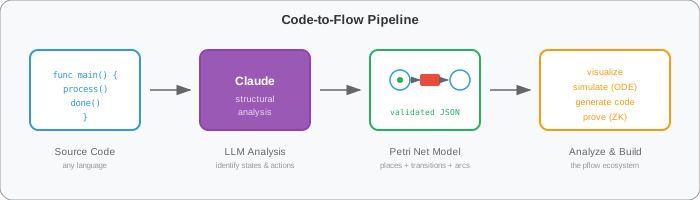
Most codebases have state machines hiding in plain sight — buried in switch statements, handler chains, and nested conditionals. code-to-flow extracts them as Petri nets.
Paste source code — Go, Python, JavaScript, Rust, Solidity — and Claude reads the structure, identifies states and actions, and outputs a validated Petri net model. Not a flowchart. A model with places, transitions, and arcs that can be simulated, analyzed for deadlocks and liveness, and used to generate a full application.
The extraction prompt enforces structural rules: every place connects to at least one transition, every transition has input and output arcs, and the model stays minimal — essence, not implementation detail. The output gets validated for both structure (no dangling nodes, proper arc connectivity) and behavior (reachability, deadlock detection, liveness).
The same code looks different through different lenses:
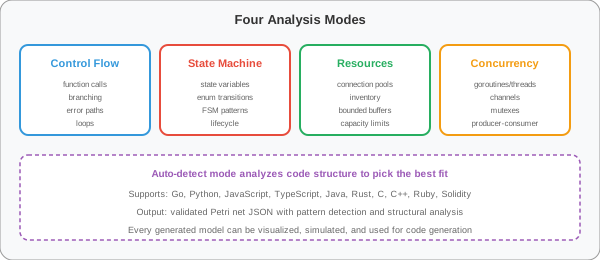
Auto-detect picks the best fit, or we can force a specific lens to see the same code from different angles. These lenses connect to the formal categorical notion where the net is a bidirectional map between complex state and strategic view — see The Incidence Reduction.
A simple order handler:
func processOrder(order Order) error {
    if err := validate(order); err != nil {
        return err
    }
    charge(order.Payment)
    ship(order.Address)
    notify(order.Customer)
    return nil
}
Code-to-flow extracts six places (pending, validated, charged, shipped, completed, failed), four transitions (validate, charge, ship, notify), and the arcs connecting them. ODE analysis shows flow rates through the pipeline. We can check for deadlocks — what if charge fails but we still try to ship? — and generate an application from the verified model.
pflow.xyz is for drawing nets from scratch. Code-to-flow solves the opposite problem: there's already a codebase and we want to see what state machine it encodes.
The LLM handles the pattern recognition — identifying states, transition triggers, resource consumption — and produces a model that makes the implicit structure explicit. It also works as a comprehension tool. Paste unfamiliar code, get back a Petri net that shows the flow. The visual model is often easier to reason about than reading the source.
Web UI — pilot.pflow.xyz/code-to-flow/. Code on the left, model on the right. Copy JSON or open in the visual editor.
HTTP API — POST /api/code-to-flow with {"code": "...", "language": "go", "focus": "state-machine"}. Returns the model with validation results and a preview URL.
MCP Tool — petri_code_to_flow works with Claude Desktop, Cursor, and other MCP clients. Claude calls the tool directly and returns a Petri net in conversation.
Previously the pflow pipeline ran one direction:
design model → generate code → deploy
Code-to-flow reverses it:
existing code → extract model → analyze → improve → regenerate
Take a legacy system, extract the state machine as a Petri net, prove properties (bounded? live? deadlock-free?), then generate a clean implementation from the verified model. The model stays the source of truth. Claude is the bridge between informal code and formal nets.
Try it: pilot.pflow.xyz/code-to-flow/
See also: Introducing Petri-Pilot for the full tutorial platform, and Declarative Differential Models for the ODE analysis theory.